
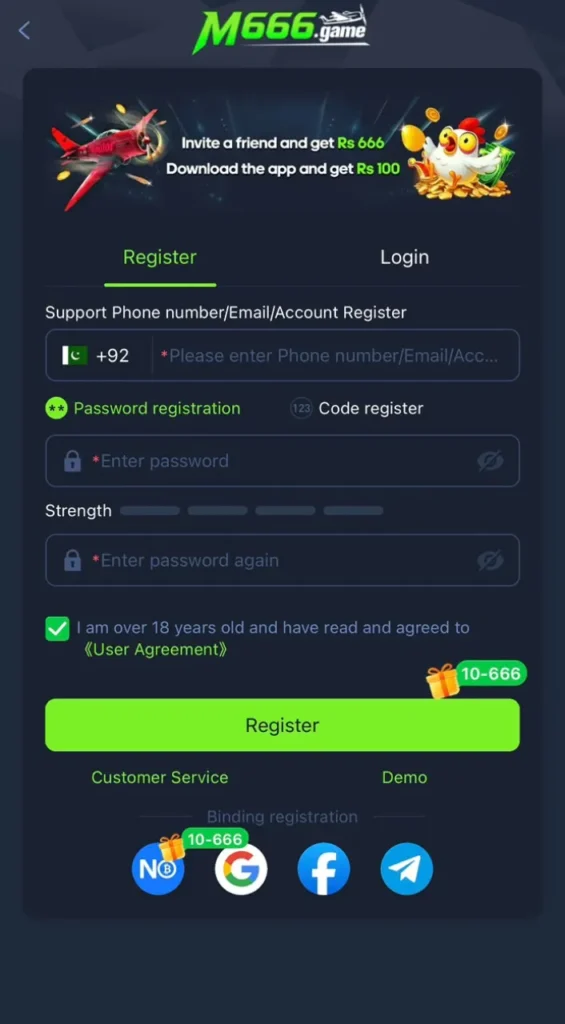
To register on M666 Game you open the app and tap register and type your mobile number and set a strong password and submit the form. You must be 18 years or older and you should use your own number because a code may come on it for checks.
What You Need to Register
You need a working mobile number that stays with you because your account and your password recovery both hang on that number. Players who want the full picture first can read the complete app guide on the homepage and come back here after that. You also need the M666 Game app installed on your Android phone and you can get it from the download guide on this site if you have not installed it yet.
You must be 18 years or older to create an account and play real money games. Keep a pen or a safe note ready for your password because a password you forget at the start causes the most common support request from new players.
M666 Register Steps in Full
The register button sits on the first screen of the app and it opens the sign up form.
Add your number with care and read it back once because a code may come on this number.
Use a mix of letters and numbers that others cannot guess and avoid your name or birth year.
If a friend gave you a code then type it now because most apps do not accept it later.
Tap submit and wait for the success message on screen.
Use the same number and password to open your fresh account and check your profile page.
If the app is not on your phone yet then start with the Android download steps for the M666 app and come back to this page after the install.
OTP and Code Help
Some sign ups ask for a one time code that arrives by message on your number. Keep your phone near you during the sign up so you can read the code at once and type it before it expires. Codes can take a short while when the network is busy so wait a bit before you ask for a new one.
If no code arrives then check that your number is typed right and that your phone has signal. Ask for a fresh code only once and wait again because too many requests can lock the process for a while. Never share a code with any person because real support will never ask you for it.
Common Register Mistakes to Avoid
Using a number that is not yours
An account on a borrowed number is an account you can lose. The owner of that number controls password recovery so always register with your own active number.
Typing the number with a wrong digit
One wrong digit sends your code to a stranger and blocks your sign up. Read the number back slowly before you submit the form.
Picking a weak password
Short passwords and common words fall fast. Use a longer mix and keep it different from passwords you use on other apps.
Creating more than one account
Extra accounts made for tricks can lead to a block on all of them. One honest account keeps your balance and rewards safe.
Skipping the age rule
The app is for adults only. An account made by a minor can be closed and any balance talk becomes hard so respect the 18 plus rule from the start.
Account Safety Tips for New Players
Save your login details in a place that only you can reach and never in a shared note or a chat. Log out on any phone that is not yours and never let a stranger hold your phone while you are signed in.
Set your budget rules on day one while your mind is calm. Decide how much play money you can afford each week and write it down. A rule set early is far easier to follow than a rule made after a loss.
When your account is ready you can sign in to your M666 account in seconds with the same number and password you used here.
What Happens After You Register
Your account home page opens with your profile and your wallet and the game lobby. Take a slow tour first and open each category to see what the app offers before you deposit anything. When you feel ready then read the deposit guide for JazzCash and Easypaisa payments so your first payment goes through in a safe and clear way.
Why the App Asks for Your Mobile Number
Your mobile number is the identity of your account in this app. It works like a username that you can never forget and it lets the app send you codes for sign up and for password recovery. It also ties your wallet actions to one person which keeps deposit and withdraw records clean and easy to trace.
Because the number carries so much weight you should treat it as part of your password. If you change your number in daily life then update your account path through in app support before you lose access to the old SIM.
Register With a Referral Link
If a friend invites you then open their referral link before you sign up so the app can tie your new account to their invite. Joining through a link takes the same steps as a normal sign up and the only extra care is timing because a code added after the account exists may not count.
Rewards from referrals follow the live rules inside the app and they can change with time. Never pay anyone for a special referral code because invites are free and paid codes are a common trick used on new players.
What a Strong Password Looks Like
A strong password is long and random and used on this app alone. Mix small and capital letters with numbers and avoid words that sit in any dictionary. Your name and your city and your birth year are the first guesses of anyone who tries to break in so keep them out.
Write the password on paper and keep the paper at home if your memory is weak. A paper note in a drawer is safer than a photo of the password in a shared phone gallery. Change the password at once if you ever type it on a phone that is not yours.
If Sign Up Fails at the Last Step
Sometimes the form fills right but the submit fails because the connection drops at the wrong second. Do not tap submit again and again because that can create a half made account state. Close the app and open it again and try to log in with the details you just set because the account may already exist.
If login fails too then wait a few minutes and register once more with a stable connection. Use the exact same number so any partial record links to your fresh try instead of splitting into two.
Before You Register Final Checklist
Check that your SIM is active in the phone in your hand and that you can receive messages on it right now because the sign up code and all later recovery steps depend on that one number. Check that your phone clock shows the right time because wrong time settings can break code checks in many apps and cause a failed sign up that looks like a server fault.
Decide your password before you open the form and say it in your mind once so you type the same password in both fields without a mismatch. Keep the form free of rush and read each field label with care because most failed sign ups come from hurry and not from any fault in the app itself. The homepage guide to games and payments shows what waits inside that lobby.
After a clean sign up the lobby opens with clear game groups and your profile sits one tap away and that first view is your proof that the account was made the right way.
More Register Mistakes Players Make
Typing the password with caps lock on
A password typed with caps lock on will not match when you type it later in the normal way and the account feels locked from day one so always watch the case of each letter at sign up.
Using a work number that may change
A number tied to a job or a borrowed SIM can vanish later and take your recovery path with it so the safest number is your own personal number that you plan to keep for years.
Closing the app during the code wait
Closing the app while you wait for a code can cancel the sign up flow in some builds so keep the app open and read the code from the message bar at the top of the screen.